
Before Director Console API v1.3.0, Director Console UI v1.5.0, and LogPoint Search Master (LPSM) v1.3.0, the Director setup did not support multiple versions of the Fabric-enabled LogPoint instances. If you upgraded the LogPoint, you also had to upgrade the Director setup to a compatible version. The upgraded Director setup then did not support the previous LogPoint version.
Starting from Director Console API v1.3.0, Director Console UI v1.5.0, LogPoint Search Master (LPSM) v1.3.0, and LogPoint v6.6.0, the Director setup supports different LogPoint versions. If you upgrade the Director setup, upgrading the LogPoint is optional. The upgraded Director setup supports the existing LogPoint version and the upgraded LogPoint version if both the versions are compatible. This feature makes the Director setup backward compatible.
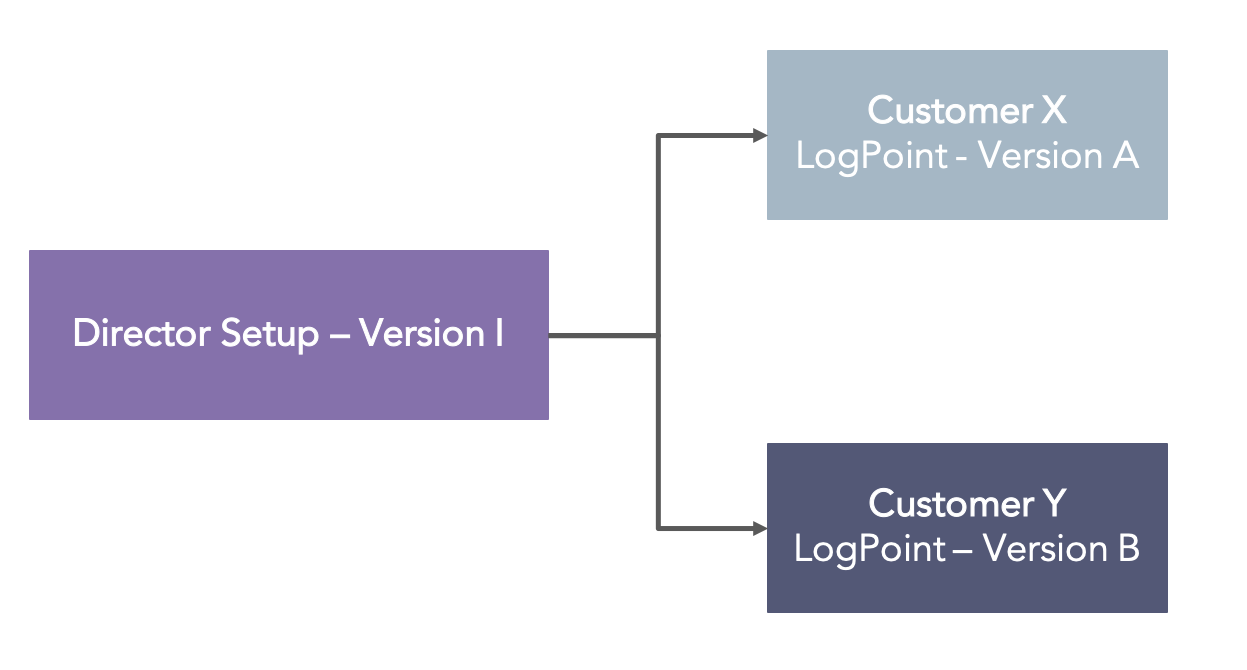
Incoherent LogPoint Versions in the Director Setup
Note
Currently, the Director setup consists of the following versions:
Director Fabric v1.8.0 (API Server and Fabric Server)
Director Console UI v1.10.0 or v1.10.1
LogPoint Search Master v1.8.0
Starting from Director Fabric v1.3.0 and LogPoint v6.6.0, the Director Console APIs support multiple versions of Fabric-enabled LogPoint instances. You can configure the entities in multiple versions of Fabric-enabled LogPoint instances using the Director Console APIs if the configuration parameter of the entities are compatible with each other.
However, you cannot configure the entities of a Fabric-enabled LogPoint that lead to a breaking change for an API. To configure those entities, you must upgrade the Director Fabric to the version with the fixes for the breaking changes. Refer to the API Documentation for details on breaking change.
Note
Currently, Director Fabric v1.8.0 is compatible with LogPoint v6.8.0 and later.
If any entity in a Fabric-enabled LogPoint leads to a breaking change for an API, the POST, PUT, and DELETE requests cannot be accessed via the API server. However, the GET request can be accessed in all instances except when there is a change in the data type of a response parameter.
From now on, you can use one of the following formats for the root url while making an API request:
https://api-server-host-name/configapi/{pool_UUID}/{logpoint_identifier}/ (Recommended)
https://api-server-host-name/configapi/v1/{pool_UUID}/{logpoint_identifier}/
https://api-server-host-name/configapi/v1.3.0/{pool_UUID}/{logpoint_identifier}/
Starting from Director Console v1.5.0 and LogPoint v6.6.0, Director Console supports multiple versions of Fabric-enabled LogPoint instances. You can configure bulk actions in different LogPoint versions if their configuration parameters are the same.
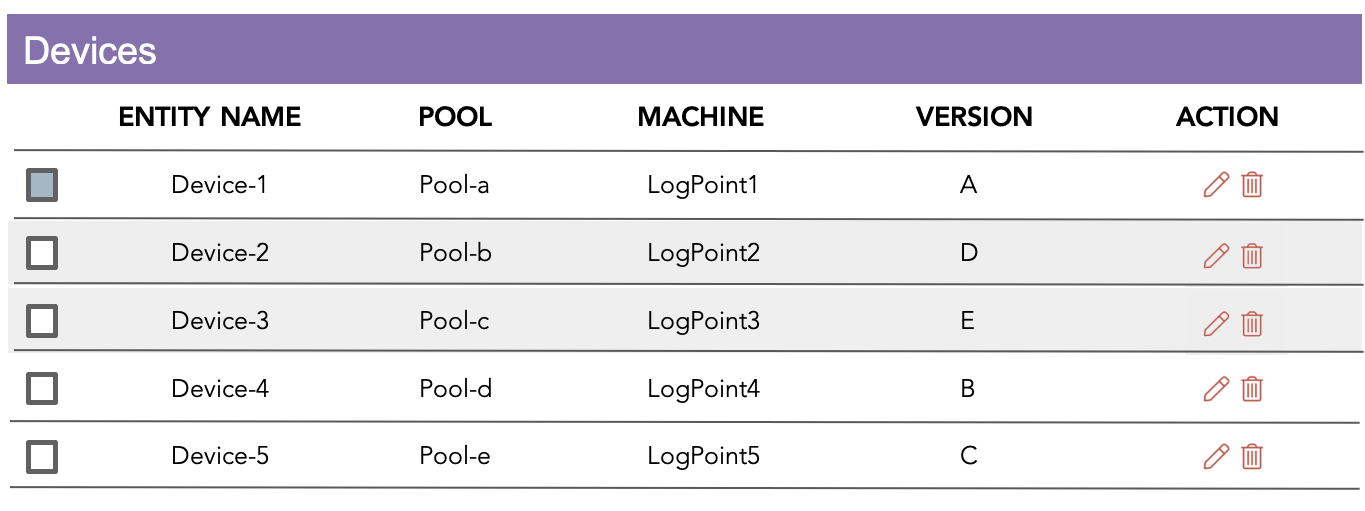
Incoherency in the Director Console
In the figure above, each device is configured to a different LogPoint version. However, the configuration of selected LogPoint1 Device-1 is compatible with the configuration of LogPoint4 Device-4 and LogPoint5 Device-5 only. You can perform bulk action at once in these devices. However, the Director Console disables the devices that are not compatible with the selected device’s LogPoint version.
Note
Currently, Director Console v1.10.0 or v1.10.1 is compatible with LogPoint v6.8.0 and later.
Starting from LPSM v1.3.0 and LogPoint v6.6.0, LPSM supports multiple versions of Fabric-enabled LogPoint instances. You can manage and perform bulk actions in different LogPoint versions if their configuration parameters are the same.
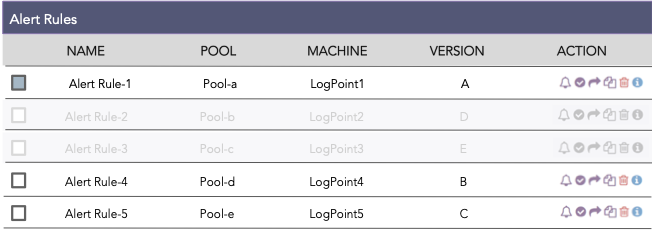
Incoherency in LPSM
In the figure above, each alert rule is configured to a different LogPoint version. However, the selected LogPoint1: AlertRule 1 is compatible with the LogPoint4: AlertRule-4 and LogPoint5: AlertRule-5 only. You can perform bulk action at once for these alert rules. However, LPSM disables the alert rules that are not compatible with the selected alert rule’s LogPoint version.
Note
Currently, LPSM v1.8.0 is compatible with LogPoint v6.8.0 and later.
When using a Director setup with incoherent LogPoint versions, connecting a new Fabric-enabled LogPoint might in some cases fail to update the LPSM with the latest configuration.
You can use the update-incoherent-config command exposed to the li-admin user to update the LPSM with the latest configuration of the newly added Fabric-enabled LogPoint. Refer to the update-incoherent-config section for details.